

Fraud and Security Center
Important Security Notice
We will NEVER contact you by phone, email, or text to request sensitive personal information such as your:
- Online banking login credentials
- Passwords or PINs
- Social Security Number
- Debit or credit card numbers
- Account numbers
If someone asks for this information, it is a scam. Do not respond.
Please notify us if you receive a suspicious email or text from us:
- Email – Forward the email to abuse@oucu.org
- Text – Screenshot the text and send the phone number of the sender to abuse@oucu.org.
If you think you’ve mistakenly provided personal information to a fraudulent site, please contact us immediately.
We’re more than just a financial partner — we’re on your side. We’re committed to helping you protect your information and stay informed, confident, and secure.
Current Fraud Alerts
Be aware of the following scams affecting members:
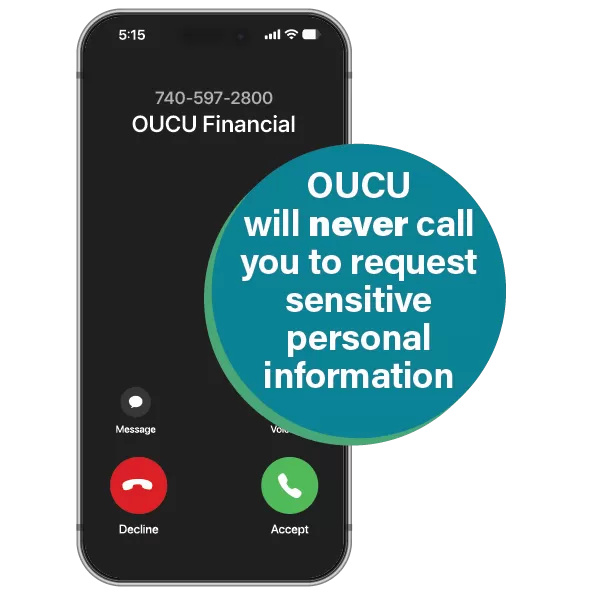
Spoofed Phone Calls & Texts
Scammers are impersonating us by spoofing our phone number (740-597-2800). They claim there is suspicious activity on your account and ask for sensitive information.
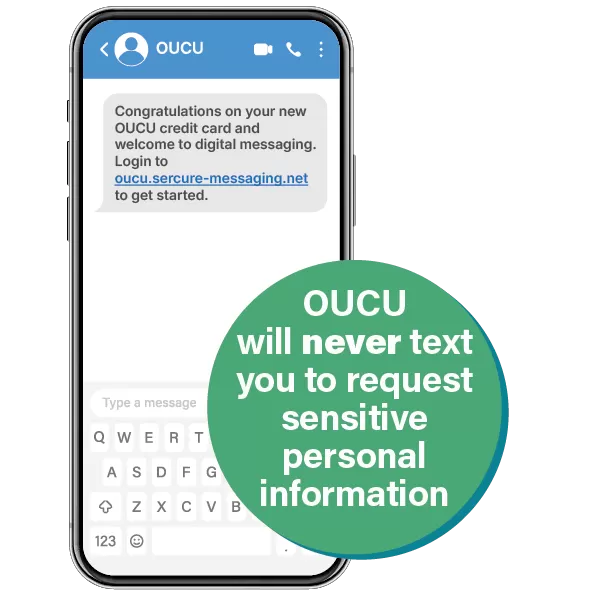
Credit Card Scam Texts
Members have reported receiving texts congratulating them on a new OUCU credit card and welcoming them to digital messaging. These messages are fraudulent.
What to do:


Think You’ve Been Scammed?

If you believe your information may be compromised, act quickly. We’re here to help.
If your account credentials may be compromised:
- Call us immediately: 740-597-2800 or 800-562-8420
- Log in to online banking and change your password
If your debit or credit card is affected:
- Call us during business hours: 740-597-2800
- After hours: (866) 820-1042
- Temporarily lock your debit or credit card in online banking or the mobile app by navigating to ‘Cards’, selecting the second set of 3 dots for card controls, then toggle ‘card status’ to gray ‘inactive’
If You are a Victim of Identity Theft:
Visit our Identity Theft Resource Center to get started.
Common Scams
Phone & Text Scams
Scammers may call or text pretending to be your financial institution or a merchant. They often create urgency by claiming there’s suspicious activity and ask you to “verify” your information.
Email Scams (Phishing)
Fraudulent emails may appear to come from trusted companies and ask you to click a link or provide information. These links often lead to fake websites designed to steal your login credentials.
Paper Check Scams
You may be asked to deposit a check and send part of the money back. The check is fake, and you are responsible for the full amount.
Romance Scams
Scammers play on emotions to build relationships online and then request money due to fake emergencies. Never send money to someone you haven’t met in person.
Sextortion Scams
Scammers may build trust online and then pressure you into sharing explicit images. They then threaten to release them unless you pay. If this happens:
- Do not pay
- Stop all communication
- Save evidence (screenshots)
- Report and block the account
- File a report at www.ic3.gov
Crypto & Gift Card Scams
Scammers often request payment through cryptocurrency or gift cards. These payments are difficult to trace and recover. If a cryptocurrency deal sounds too good to be true, it probably is.
Job Posting Scams
Scammers pose as employers offering attractive "work-from-home" jobs or remote assistant positions, often for companies that people recognize, such as Amazon or Walmart. They may be seeking to obtain personal information through a phony hiring process, or may even ask you to deposit a "company check" for equipment and wire a portion of it back, only for the check to bounce later, leaving you on the hook for the balance.
How to Protect Yourself
Phone & Text Use Strong Passwords
Create unique, complex passwords and never share them. Avoid using easily accessible information like birthdays or pet names.
Enable Multi-Factor Authentication
Use one-time passcodes or authentication apps whenever available for added security.
Set Up Account Alerts
Account Alerts: In online or mobile banking. Click on the three lines at the top left of the screen, then select “Alert Settings.” Alert Preferences allows you to choose SMS zohotext and/or email alerts. Account Specific Alerts lets you turn on your preferred alerts.
Card Alerts: Navigate to ‘Cards’, select the second set of 3 dots for card controls. Under ‘Select controls’ use the pull-down menu and choose ‘Card alerts’ to set a transaction alert when your card is used.
Monitor Your Accounts
Check your account activity regularly and review your monthly statements for unauthorized transactions.
Use Secure Channels
Avoid accessing financial information on public Wi-Fi. Do not send sensitive information via email — use secure messaging in online banking or call us instead.
Keep Your PIN Private
Never share your debit or credit card PIN and avoid storing it where others can find it.
Review Your Credit Report
Check your credit report at least once per year with each bureau to look for signs of identity theft.
Credit Bureaus:
- Equifax — www.equifax.com — 800-525-6285
- Experian — www.experian.com — 888-397-3742
- TransUnion — www.transunion.com — 800-916-8800
Additional Resources

Recognizing and Avoiding Scams
Staying informed is your best defense against fraud.
If you ever feel unsure about a message or request, contact us directly —
we’re here to help protect you every step of the way.
Go to main navigation